
SEOmoz Linkscape API is an extremely powerful tool for SEOs, but SEOs often do not come from a development background, and might find the API inaccessible to them. Whilst I believe SEOs should learn to code somewhat, I know not everyone is from that school of thought. If you are unfamiliar with the API, then you can see the SEOmoz API wiki; we’re going to be looking at the URL Metrics API.
Luckily, a recent blog post from Ian Lurie details using Linkscape API with Google Spreadsheets. Ian’s post is great, and probably does exactly what you are looking for. What I post here is a modified version the code from his post, which I used to form the basis of a competitive analysis tool detailed in my recent SEOmoz post: Competitive Analysis in under 60 Seconds using Google Docs.
You can see the code in action in my example spreadsheet (you’ll need to copy if and add your SEOmoz API key), or take a peek here:
var AccessID;
var secret;

function readLinkscapeConfig() {
    var active_spreadsheet = SpreadsheetApp.getActiveSpreadsheet();
    var config_sheet = active_spreadsheet.getSheetByName("Config");
    params = config_sheet.getRange(1,2,2,2).getValues();
    AccessID = params[0][0];
    secret = params[1][0];
}

function generateExpiry() {
    method = "HMAC_SHA_1";
    uDate = new Date().getTime();
    uDate = Math.round(uDate/1000);
    Expires = uDate + 1200;

    return Expires;
}

function generateSignature(Expires) {
    theString = AccessID + "\n" + Expires;
    signature = Utilities.computeHmacSignature(Utilities.MacAlgorithm.HMAC_SHA_1,theString,secret);
    signature64 = Utilities.base64Encode(signature);
    signature64 = encodeURIComponent(signature64);

    return signature64;
}

function getLinkscapeData(url, dummy) {
    readLinkscapeConfig();

    Expires = generateExpiry();
    signature64 = generateSignature(Expires);
    inV="http://lsapi.seomoz.com/linkscape/url-metrics/" + url + "?AccessID=" + AccessID + "&Expires=" + Expires + "&Signature=" + signature64 + "&Cols=85899378688";
    jsonStringResponse = UrlFetchApp.fetch(inV);

    var data1 = jsonStringResponse.getContentText();
    data2 = Utilities.jsonParse(data1);
    IDomains = data2["fipl"];
    Dauth = data2["pda"];
    mzRnk = data2["fmrp"];


    var returnData = new Array(3);
    returnData[0] = mzRnk.toFixed(2);
    returnData[1] = Dauth.toFixed(2);;
    returnData[2] = IDomains;

    return returnData;
}
In Google Spreadsheets, you can select “Make a copy” in the File menu to create your own private copy of the spreadsheet to work on. You’ll need to add your SEOmoz API Access ID and secret key (from SEOmoz API page) to the ‘Config’ sheet. You can select Tools -> Script Editor in order to see and edit the code to your own purposes, if you’d like to return a different combination of metrics.
Editing the Code
I return 3 pieces of information about a URL: mozRank, Domain Authority, and linking root domains to the subdomain of the URL.
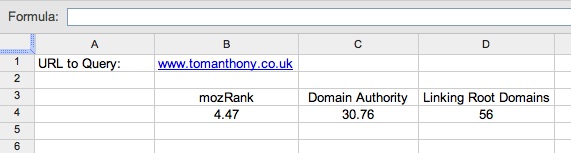
However, you can change that my modifying this section of the code:
var data1 = jsonStringResponse.getContentText();
    data2 = Utilities.jsonParse(data1);
    IDomains = data2["fipl"];
    Dauth = data2["pda"];
    mzRnk = data2["fmrp"];
The codes fipl, pda, and fmrp refer to pieces of information the API is able to give you; you can find a full list of them on the URL Metrics API wiki page. Be sure to check the right hand column to see if they are included in the free API if that is all you have access to. You can edit the above code to include those you want, but that isn’t the end of the story, you also need to edit a couple of other pieces:
inV="http://lsapi.seomoz.com/linkscape/url-metrics/" + url + "?AccessID=" + AccessID + "&Expires=" + Expires + "&Signature=" + signature64 + "&Cols=85899378688";
The number 85899378688 is a mask which tells the API which columns to passback (you could always just ask for them all, but that puts more load on the API servers, and isn’t polite!). It is based around how computers store numbers, but luckily all you need to know is that you select which metrics you want from the API and then URL Metrics API page you add up the corresponding rows in the “Bit Flags” column. For example we used fipl (17179869184), pda (68719476736), and fmrp (32768), so we add 17179869184 + 68719476736 + 32768 = 85899378688. Easy when you know how!
Lastly, you need to make the code pass back the fields you’ve selected, so need to update:
var returnData = new Array(3);
    returnData[0] = mzRnk.toFixed(2);
    returnData[1] = Dauth.toFixed(2);;
    returnData[2] = IDomains;
to the fields you created above. The ’toFixed’ function rounds off numbers to the second decimal place, which will make things much neater and tidier for you.
Using the Code in a Tool
Hopefully, this will have given you some insight into how to go about using the Linkscape API and modifying it your needs. I used this to create a tool for Competitive Analysis which you can read about in my SEOmoz post: Competitive Analysis in under 60 Seconds using Google Docs.
Please post a comment to let me know if you are using this and what awesome tools you’ve come up with. :)
UPDATE: Chris Le over at SEER Interactive has just released a post with an updated version of this code, which accounts for the new rate limits on the Moz API. I recommend you use his version. Thanks Chris!